hoomd#
Overview
Define box dimensions. |
|
A mutable collection of operations which act on a |
|
Define a simulation. |
|
Self-contained copy of the simulation |
|
The state of a |
Details
HOOMD-blue python package.
hoomd is the top level HOOMD-blue Python package. It consists of the common
code shared among all types of HOOMD-blue simulations. The core data structures
used to construct a simulation include:
See the table of contents or the modules section for a full list of classes, methods, and variables in the API.
hoomd also contains subpackages that implement specific types of simulations:
hoomd.hpmc- Hard particle Monte Carlo.hoomd.md- Molecular dynamics.
See also
Tutorial: Introducing HOOMD-blue
Signal handling
On import, hoomd installs a SIGTERM signal handler that calls sys.exit
so that open gsd files have a chance to flush write buffers
(hoomd.write.GSD.flush) when a user’s process is terminated. Use
signal.signal to adjust this behavior as needed.
- class hoomd.Box(Lx, Ly, Lz=0, xy=0, xz=0, yz=0)#
Define box dimensions.
- Parameters:
Lx (float) – box extent in the x direction \([\mathrm{length}]\).
Ly (float) – box extent in the y direction \([\mathrm{length}]\).
Lz (float) – box extent in the z direction \([\mathrm{length}]\).
xy (float) – tilt factor xy \([\mathrm{dimensionless}]\).
xz (float) – tilt factor xz \([\mathrm{dimensionless}]\).
yz (float) – tilt factor yz \([\mathrm{dimensionless}]\).
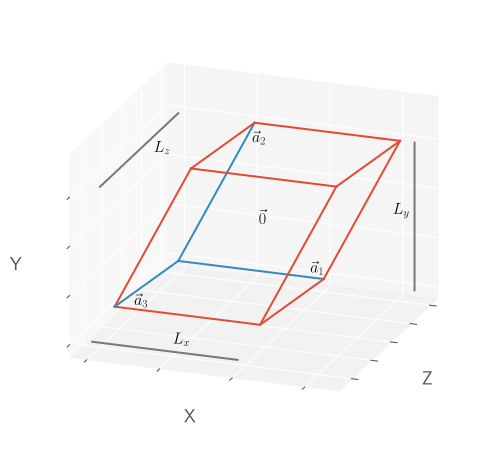
Particles in a simulation exist in a triclinic box with periodic boundary conditions. A triclinic box is defined by six values: the extents \(L_x\), \(L_y\) and \(L_z\) of the box in the three directions, and three tilt factors \(xy\), \(xz\) and \(yz\).
The parameter matrix is defined in terms of the lattice vectors \(\vec a_1\), \(\vec a_2\) and \(\vec a_3\):
\[\left( \vec a_1, \vec a_2, \vec a_3 \right)\]The first lattice vector \(\vec a_1\) is parallel to the unit vector \(\vec e_x = (1,0,0)\). The tilt factor \(xy\) indicates how the second lattice vector \(\vec a_2\) is tilted with respect to the first one. Similarly, \(xz\) and \(yz\) indicate the tilt of the third lattice vector \(\vec a_3\) with respect to the first and second lattice vector.
The full cell parameter matrix is:
\[\begin{split}\left(\begin{array}{ccc} L_x & xy L_y & xz L_z \\ 0 & L_y & yz L_z \\ 0 & 0 & L_z \\ \end{array}\right)\end{split}\]The tilt factors \(xy\), \(xz\) and \(yz\) are dimensionless. The relationships between the tilt factors and the box angles \(\alpha\), \(\beta\) and \(\gamma\) are as follows:
\[\begin{split}\cos\gamma &= \cos(\angle\vec a_1, \vec a_2) &=& \frac{xy}{\sqrt{1+xy^2}}\\ \cos\beta &= \cos(\angle\vec a_1, \vec a_3) &=& \frac{xz}{\sqrt{1+xz^2+yz^2}}\\ \cos\alpha &= \cos(\angle\vec a_2, \vec a_3) &=& \frac{xy \cdot xz + yz}{\sqrt{1+xy^2} \sqrt{1+xz^2+yz^2}}\end{split}\]Given an arbitrarily oriented lattice with box vectors \(\vec v_1, \vec v_2, \vec v_3\), the parameters for the rotated box can be found as follows:
\[\begin{split}L_x &= v_1\\ a_{2x} &= \frac{\vec v_1 \cdot \vec v_2}{v_1}\\ L_y &= \sqrt{v_2^2 - a_{2x}^2}\\ xy &= \frac{a_{2x}}{L_y}\\ L_z &= \vec v_3 \cdot \frac{\vec v_1 \times \vec v_2}{\left| \vec v_1 \times \vec v_2 \right|}\\ a_{3x} &= \frac{\vec v_1 \cdot \vec v_3}{v_1}\\ xz &= \frac{a_{3x}}{L_z}\\ yz &= \frac{\vec v_2 \cdot \vec v_3 - a_{2x}a_{3x}}{L_y L_z}\end{split}\]Box images
HOOMD-blue always stores particle positions \(\vec{r}\) inside the primary box image which includes the origin at the center. The primary box image include the left, bottom, and back face while excluding the right, top, and front face. In cubic boxes, this implies that the particle coordinates in the primary box image are in the interval \(\left[ -\frac{L}{2},\frac{L}{2} \right)\).
Unless otherwise noted in the documentation, operations apply the minimum image convention when computing pairwise interactions between particles:
\[\vec{r}_{ij} = \mathrm{minimum\_image}(\vec{r}_j - \vec{r}_i)\]When running simulations with a fixed box size, use the particle images \(\vec{n}\) to compute the unwrapped coordinates:
\[\vec{r}_\mathrm{unwrapped} = \vec{r} + n_x \vec{a}_1 + n_y \vec{a}_2 + n_z \vec{a}_3\]Two dimensional systems
Set
Lz == 0to make the box 2D. 2D boxes ignorexzandyz. Changing the box dimensionality from 2D to 3D (or from 3D to 2D) during a simulation will result in undefined behavior.In 2D boxes, volume is in units of \([\mathrm{length}]^2\).
Factory Methods
Boxhas factory methods to enable easier creation of boxes:cube,square,from_matrix, andfrom_box. See each method’s documentation for more details.Example:
box = hoomd.Box(Lx=10, Ly=20, Lz=30, xy=0.5, xz=0.2, yz=0.1)
- property L#
The box lengths,
[Lx, Ly, Lz]\([\mathrm{length}]\).Can be set with a float which sets all lengths, or a length 3 vector.
Example:
box.L = (15, 30, 60)
- Type:
(3, )
numpy.ndarrayoffloat
- property Lx#
The length of the box in the x dimension \([\mathrm{length}]\).
Example:
box.Lx = 15
- Type:
- property Ly#
The length of the box in the y dimension \([\mathrm{length}]\).
Example:
box.Ly = 30
- Type:
- property Lz#
The length of the box in the z dimension \([\mathrm{length}]\).
Example:
box.Lz = 60
- Type:
- __eq__(other)#
Test if boxes are equal.
- __neq__(other)#
Test if boxes are not equal.
- __reduce__()#
Reduce values to picklable format.
- __repr__()#
Executable representation of the object.
- classmethod cube(L)#
Create a cube with side lengths
L.- Parameters:
L (float) – The box side length \([\mathrm{length}]\).
- Returns:
The created 3D box.
- Return type:
Example:
box = hoomd.Box.cube(L=13)
- property dimensions#
The dimensionality of the box.
If
Lz == 0, the box is treated as 2D, otherwise it is 3D. This property is not settable.Example:
if box.dimensions == 2:
    pass
- Type:
- classmethod from_box(box)#
Initialize a Box instance from a box-like object.
- Parameters:
box (box_like) – A box-like object.
Note
If all values are provided, a triclinic box will be constructed. If only
Lx, Ly, Lzare provided, an orthorhombic box will be constructed. If onlyLx, Lyare provided, a rectangular (2D) box will be constructed.- Returns:
The resulting box object.
- Return type:
Example:
box = hoomd.Box.from_box(box=[10, 20, 30, 0.5, 0.2, 0.1])
- classmethod from_matrix(box_matrix)#
Create a box from an upper triangular matrix.
- Parameters:
box_matrix ((3, 3)
numpy.ndarrayoffloat) –An upper triangular matrix representing a box. The values for
Lx,Ly,Lz,xy,xz, andyzare related to the matrix:\[\begin{split}\begin{bmatrix} L_x & L_y \cdot xy & L_z \cdot xz \\ 0 & L_y & L_z \cdot yz \\ 0 & 0 & L_z \end{bmatrix}\end{split}\]- Returns:
The created box.
- Return type:
Example:
box = hoomd.Box.from_matrix(
    box_matrix = [[10, 12, 14],
                  [0, 8, 16],
                  [0, 0, 18]])
- property is2D#
Flag whether the box is 2D.
If
Lz == 0, the box is treated as 2D, otherwise it is 3D. This property is not settable.Example:
if box.is2D:
    pass
- Type:
- property periodic#
The periodicity of each dimension.
periodicis always(True, True, True)for the box associated with the simulationState. Some components ofperiodicmay beFalsein thehoomd.data.LocalSnapshotbox attribute in MPI domain decomposition simulations. This indicates which box directions are communicated with neighboring ranks (False) and which are not (True).- Type:
(3, )
numpy.ndarrayofbool
- scale(s)#
Scale box dimensions.
Scales the box in place by the given scale factors. Tilt factors are not modified.
- Parameters:
s (float or list[float]) – scale factors in each dimension. If a single float is given then scale all dimensions by s; otherwise, s must be a sequence of 3 values used to scale each dimension.
- Returns:
self
Examples:
box.scale(2)
box.scale((1, 2, 4))
- classmethod square(L)#
Create a square with side lengths
L.- Parameters:
L (float) – The box side length \([\mathrm{length}]\).
- Returns:
The created 2D box.
- Return type:
box = hoomd.Box.square(L=128)
- property tilts#
The box tilts,
[xy, xz, yz].Can be set using one tilt for all axes or three tilts. If the box is 2D
xzandyzwill automatically be set to zero.Example:
box.tilts = (1.1, 0.8, 0.2)
- Type:
(3, )
numpy.ndarrayoffloat
- to_matrix()#
(3, 3)
numpy.ndarrayfloat: The upper triangular matrix that defines the box.[[Lx, Ly * xy, Lz * xz], [0, Ly, Lz * yz], [0, 0, Lz]]
Example:
matrix = box.to_matrix()
- property volume#
Volume of the box.
\([\mathrm{length}]^{2}\) in 2D and \([\mathrm{length}]^{3}\) in 3D.
When setting volume the aspect ratio of the box is maintained while the lengths are changed.
Example:
box.volume = 2000
- Type:
- class hoomd.Operations#
A mutable collection of operations which act on a
Simulation.An
Operationsclass instance contains all the operations acting on a simulation. These operations are classes that perform various actions on ahoomd.Simulation. Operations can be added and removed at any point from ahoomd.Operationsinstance. The class provides the interface defined bycollections.abc.Collection. Other methods for manipulating instances mimic Python objects where possible, but the class is not simply a mutable list or set.Operationsobjects manage multiple independent sequences described below.The types of operations which can be added to an
Operationsobject are tuners, updaters, integrators, writers, and computes. AnOperationsinstance can have zero or one integrator and any number of tuners, updaters, writers, or computes. To see examples of these types of operations seehoomd.tune(tuners),hoomd.update(updaters),hoomd.hpmc.integrateorhoomd.md.Integrator(integrators),hoomd.write(writers), andhoomd.md.compute.ThermodynamicQuantities(computes).A given instance of an operation class can only be added to a single
Operationscontainer. Likewise, a single instance cannot be added to the sameOperationscontainer more than once.All
Operationsinstances start with ahoomd.tune.ParticleSorterinstance in theirtunersattribute. This increases simulation performance. However, users can choose to modify or remove this tuner if desired.Note
An
Operationsobject is created by default when a new simulation is created.- __contains__(operation)#
Whether an operation is contained in this container.
- Parameters:
operation – Returns whether this exact operation is contained in the collection.
Example:
operation in simulation.operations
- __getstate__()#
Get the current state of the operations container for pickling.
- __iadd__(operation)#
Works the same as
Operations.add.- Parameters:
operation (hoomd.operation.Operation) – A HOOMD-blue tuner, updater, integrator, writer, or compute to add to the object.
Example:
simulation.operations += operation
- __isub__(operation)#
Works the same as
Operations.remove.- Parameters:
operation (hoomd.operation.Operation) – A HOOMD-blue integrator, tuner, updater, integrator, analyzer, or compute to remove from the collection.
Example:
simulation.operations -= operation
- __iter__()#
Iterates through all contained operations.
Example:
for operation in simulation.operations:
    pass
- __len__()#
Return the number of operations contained in this collection.
Example:
len(simulation.operations)
- add(operation)#
Add an operation to this container.
Adds the provided operation to the appropriate attribute of the
Operationsinstance.- Parameters:
operation (hoomd.operation.Operation) – A HOOMD-blue tuner, updater, integrator, writer, or compute to add to the collection.
- Raises:
TypeError – If
operationis not of a valid type.
Note
Since only one integrator can be associated with an
Operationsobject at a time, this removes the current integrator when called with an integrator operation. Also, theintegratorproperty cannot be set toNoneusing this function. Useoperations.integrator = Noneexplicitly for this.Example:
simulation.operations.add(operation)
- property computes#
A list of compute operations.
Holds the list of computes associated with this collection. The list can be modified as a standard Python list.
- Type:
list[
hoomd.operation.Compute]
- property integrator#
An MD or HPMC integrator object.
Operationsobjects have an initialintegratorproperty ofNone. Can be set to MD or HPMC integrators. The property can also be set toNone.Examples:
simulation.operations.integrator = hoomd.md.Integrator(dt=0.001)
simulation.operations.integrator = None
- property is_tuning_complete#
Check whether all children have completed tuning.
Truewhenis_tuning_completeisTruefor all children.Note
In MPI parallel execution,
is_tuning_completeisTrueonly when all children on all ranks have completed tuning.Example:
while (not simulation.operations.is_tuning_complete):
    simulation.run(1000)
- Type:
- remove(operation)#
Remove an operation from the
Operationsobject.Remove the item from the collection whose Python object
idis the same asoperation.- Parameters:
operation (hoomd.operation.Operation) – A HOOMD-blue integrator, tuner, updater, integrator, or compute to remove from the container.
- Raises:
ValueError – If
operationis not found in this container.TypeError – If
operationis not of a valid type.
Example:
simulation.operations.remove(operation)
- tune_kernel_parameters()#
Start tuning kernel parameters in all children.
Example:
simulation.operations.tune_kernel_parameters()
- property tuners#
A list of tuner operations.
Holds the list of tuners associated with this collection. The list can be modified as a standard Python list.
- Type:
list[
hoomd.operation.Tuner]
- property updaters#
A list of updater operations.
Holds the list of updaters associated with this collection. The list can be modified as a standard Python list.
- Type:
list[
hoomd.operation.Updater]
- property writers#
A list of writer operations.
Holds the list of writers associated with this collection. The list can be modified as a standard Python list.
- Type:
list[
hoomd.operation.Writer]
- class hoomd.Simulation(device, seed=None)#
Define a simulation.
- Parameters:
device (hoomd.device.Device) – Device to execute the simulation.
seed (int) – Random number seed.
Simulationis the central class that defines a simulation, including thestateof the system, theoperationsthat apply to the state during a simulationrun, and thedeviceto use when executing the simulation.seedsets the seed for the random number generator used by all operations added to thisSimulation.Newly initialized
Simulationobjects have no state. Callcreate_state_from_gsdorcreate_state_from_snapshotto initialize the simulation’sstate.Example:
simulation = hoomd.Simulation(device=hoomd.device.CPU(), seed=1)
- __del__()#
Clean up dangling references to simulation.
- property always_compute_pressure#
Always compute the virial and pressure (defaults to
False).By default, HOOMD only computes the virial and pressure on timesteps where it is needed (when
hoomd.write.GSDwrites log data to a file or when using an NPT integrator). Setalways_compute_pressureto True to make the per particle virial, net virial, and system pressure available to query any time by property or through thehoomd.logging.Loggerinterface.Note
Enabling this flag will result in a moderate performance penalty when using MD pair potentials.
Example:
simulation.always_compute_pressure = True
- Type:
- create_state_from_gsd(filename, frame=-1, domain_decomposition=(None, None, None))#
Create the simulation state from a GSD file.
- Parameters:
filename (str) – GSD file to read
frame (int) – Index of the frame to read from the file. Negative values index back from the last frame in the file.
domain_decomposition (tuple) – Choose how to distribute the state across MPI ranks with domain decomposition. Provide a tuple of 3 integers indicating the number of evenly spaced domains in the x, y, and z directions (e.g.
(8,4,2)). Provide a tuple of 3 lists of floats to set the fraction of the simulation box to include in each domain. The sum of each list of floats must be 1.0 (e.g.([0.25, 0.75], [0.2, 0.8], [1.0])).
When
timestepisNonebefore calling,create_state_from_gsdsetstimestepto the value in the selected GSD frame in the file.Note
Set any or all of the
domain_decompositiontuple elements toNoneandcreate_state_from_gsdwill select a value that minimizes the surface area between the domains (e.g.(2,None,None)). The domains are spaced evenly along each automatically selected direction. The default value of(None, None, None)will automatically select the number of domains in all directions.Example:
simulation.create_state_from_gsd(filename=gsd_filename)
- create_state_from_snapshot(snapshot, domain_decomposition=(None, None, None))#
Create the simulation state from a
Snapshot.- Parameters:
snapshot (Snapshot or gsd.hoomd.Frame) – Snapshot to initialize the state from. A
gsd.hoomd.Framewill first be converted to ahoomd.Snapshot.domain_decomposition (tuple) – Choose how to distribute the state across MPI ranks with domain decomposition. Provide a tuple of 3 integers indicating the number of evenly spaced domains in the x, y, and z directions (e.g.
(8,4,2)). Provide a tuple of 3 lists of floats to set the fraction of the simulation box to include in each domain. The sum of each list of floats must be 1.0 (e.g.([0.25, 0.75], [0.2, 0.8], [1.0])).
When
timestepisNonebefore calling,create_state_from_snapshotsetstimestepto 0.Note
Set any or all of the
domain_decompositiontuple elements toNoneandcreate_state_from_snapshotwill select a value that minimizes the surface area between the domains (e.g.(2,None,None)). The domains are spaced evenly along each automatically selected direction. The default value of(None, None, None)will automatically select the number of domains in all directions.Example:
simulation.create_state_from_snapshot(snapshot=snapshot)
- property device#
Device used to execute the simulation.
- Type:
- property final_timestep#
runwill end at this timestep.final_timestepis the timestep on which the currently executingrunwill complete.Example:
logger.add(obj=simulation, quantities=['final_timestep'])
(
Loggable: category=”scalar”)- Type:
- property initial_timestep#
runstarted at this timestep.initial_timestepis the timestep on which the currently executingrunstarted.Example:
logger.add(obj=simulation, quantities=['initial_timestep'])
(
Loggable: category=”scalar”)- Type:
- property operations#
The operations that apply to the state.
The operations apply to the state during the simulation run when scheduled.
See also
- Type:
- run(steps, write_at_start=False)#
Advance the simulation a number of steps.
- Parameters:
Note
Initialize the simulation’s state before calling
run.Simulationapplies itsoperationsto the state during each time step in the order: tuners, updaters, integrator, then writers following the logic in this pseudocode:if write_at_start: for writer in operations.writers: if writer.trigger(timestep): writer.write(timestep) end_step = timestep + steps while timestep < end_step: for tuner in operations.tuners: if tuner.trigger(timestep): tuner.tune(timestep) for updater in operations.updaters: if updater.trigger(timestep): updater.update(timestep) if operations.integrator is not None: operations.integrator(timestep) timestep += 1 for writer in operations.writers: if writer.trigger(timestep): writer.write(timestep)
This order of operations ensures that writers (such as
hoomd.write.GSD) capture the final output of the last step of the run loop. For example, a writer with a triggerhoomd.trigger.Periodic(period=100, phase=0)active during arun(500)would write on steps 100, 200, 300, 400, and 500. Setwrite_at_start=Trueon the first call torunto also obtain output at step 0.Warning
Using
write_at_start=Truein subsequent calls torunwill result in duplicate output frames.Example:
simulation.run(1_000)
- property seed#
Random number seed.
Seeds are in the range [0, 65535]. When set,
seedwill take only the lowest 16 bits of the given value.HOOMD-blue uses a deterministic counter based pseudorandom number generator. Any time a random value is needed, HOOMD-blue computes it as a function of the user provided seed
seed(16 bits), the currenttimestep(lower 40 bits), particle identifiers, MPI ranks, and other unique identifying values as needed to sample uncorrelated values:random_value = f(seed, timestep, ...)Example:
simulation.seed = 2
(
Loggable: category=”scalar”)- Type:
- property state#
The current simulation state.
- Type:
- property timestep#
The current simulation time step.
timestepis read only after creating the simulation state.Note
Methods like
create_state_from_gsdwill set the initial timestep from the input. Settimestepbefore creating the simulation state to override values fromcreate_methods:sim.timestep = 5000 sim.create_state_from_gsd('gsd_at_step_10000000.gsd') assert sim.timestep == 5000
(
Loggable: category=”scalar”)- Type:
- property tps#
The average number of time steps per second.
tpsis the number of steps executed divided by the elapsed walltime in seconds. It is updated during therunloop and remains fixed afterruncompletes.Warning
The elapsed walltime and timestep are reset at the beginning of each call to
run. Thus,tpswill provide noisy estimates of performance at the start and stable long term averages after many timesteps.Tip
Use the total elapsed wall time and timestep to average the timesteps executed per second at desired intervals.
Example:
logger.add(obj=simulation, quantities=['tps'])
(
Loggable: category=”scalar”)- Type:
- property walltime#
The walltime spent during the last call to
run.walltimeis the number seconds that the last call toruntook to complete. It is updated during therunloop and remains fixed afterruncompletes.See also
Example:
logger.add(obj=simulation, quantities=['walltime'])
(
Loggable: category=”scalar”)- Type:
- class hoomd.Snapshot(communicator=None)#
Self-contained copy of the simulation
State.- Parameters:
communicator (Communicator) – MPI communicator to be used when accessing the snapshot.
See
Stateandgsd.hoomd.Framefor detailed documentation on the components ofSnapshot.Note
Snapshotis duck-type compatible withgsd.hoomd.Frameexcept that arrays inSnapshotare not assignable. You can edit their contents: e.g.snapshot.particles.typeid[:] == 0.Warning
Data is only present on the root rank:
if snapshot.communicator.rank == 0:
    pos = snapshot.particles.position[0]
Example:
snapshot = hoomd.Snapshot()
- communicator#
MPI communicator.
- Type:
- property angles#
Angles.
- angles.typeid#
Angle type id.
- Type:
(N,)
numpy.ndarrayofuint32
- angles.group#
Tags of the particles in the angle.
- Type:
(N, 3)
numpy.ndarrayofuint32
Note
Set
Nto change the size of the arrays.Example:
if snapshot.communicator.rank == 0:
    snapshot.angles.N = 1
    snapshot.angles.group[:] = [[0, 1, 2]]
    snapshot.angles.types = ['A-B-B']
    snapshot.angles.typeid[:] = [0]
- property bonds#
Bonds.
- bonds.typeid#
Bond type id.
- Type:
(N,)
numpy.ndarrayofuint32
- bonds.group#
Tags of the particles in the bond.
- Type:
(N, 2)
numpy.ndarrayofuint32
Note
Set
Nto change the size of the arrays.Example:
if snapshot.communicator.rank == 0:
    snapshot.bonds.N = 2
    snapshot.bonds.group[:] = [[0, 1], [2, 3]]
    snapshot.bonds.types = ['A-B']
    snapshot.bonds.typeid[:] = [0, 0]
- property configuration#
Snapshot box configuration.
- box#
Simulation box parameters
[Lx, Ly, Lz, xy, xz, yz].
Note
boxaccepts any values thatBox.from_boxallows when setting.See also
Example:
snapshot.configuration.box = [10, 20, 30, 0.1, 0.2, 0.3]
- property constraints#
Constraints.
- constraints.value#
Constraint length.
- Type:
(N, )
numpy.ndarrayoffloat
- constraints.group#
Tags of the particles in the constraint.
- Type:
(N, 2)
numpy.ndarrayofuint32
Note
Set
Nto change the size of the arrays.Example:
if snapshot.communicator.rank == 0:
    snapshot.constraints.N = 2
    snapshot.constraints.group[:] = [[0, 1], [2, 3]]
    snapshot.constraints.value[:] = [1, 1]
- property dihedrals#
Dihedrals.
- dihedrals.typeid#
Dihedral type id.
- Type:
(N,)
numpy.ndarrayofuint32
- dihedrals.group#
Tags of the particles in the dihedral.
- Type:
(N, 4)
numpy.ndarrayofuint32
Note
Set
Nto change the size of the arrays.Example:
if snapshot.communicator.rank == 0:
    snapshot.dihedrals.N = 1
    snapshot.dihedrals.group[:] = [[0, 1, 2, 3]]
    snapshot.dihedrals.types = ['A-B-B-A']
    snapshot.dihedrals.typeid[:] = [0]
- classmethod from_gsd_frame(gsd_snap, communicator)#
Constructs a
hoomd.Snapshotfrom agsd.hoomd.Frameobject.- Parameters:
gsd_snap (gsd.hoomd.Frame) – The gsd frame to convert to a
hoomd.Snapshot.communicator (hoomd.communicator.Communicator) – The MPI communicator to use for the snapshot. This prevents the snapshot from being stored on every rank.
Tip
Use
Simulation.create_state_from_gsdto efficiently initialize the system state from a GSD file.Note
from_gsd_frameonly accesses thegsd_snapargument on rank 0. In MPI simulations, avoid duplicating memory and file reads by reading GSD files only on rank 0 and passinggsd_snap=Noneon other ranks.
- classmethod from_gsd_snapshot(gsd_snap, communicator)#
Constructs a
hoomd.Snapshotfrom agsd.hoomd.Snapshotobject.Deprecated since version 4.0.0: Use
from_gsd_frame.
- property impropers#
Impropers.
- impropers.typeid#
Improper type id.
- Type:
(N,)
numpy.ndarrayofuint32
- impropers.group#
Tags of the particles in the improper.
- Type:
(N, 4)
numpy.ndarrayofuint32
Note
Set
Nto change the size of the arrays.if snapshot.communicator.rank == 0: snapshot.impropers.N = 1 snapshot.impropers.group[:] = [[0, 1, 2, 3]] snapshot.impropers.types = ['A-B-B-A'] snapshot.impropers.typeid[:] = [0]
- property mpcd#
MPCD data.
- mpcd.position#
Particle position \([\mathrm{length}]\).
- Type:
(N, 3)
numpy.ndarrayoffloat
- mpcd.velocity#
Particle velocity \([\mathrm{velocity}]\).
- Type:
(N, 3)
numpy.ndarrayoffloat
- mpcd.typeid#
Particle type id.
- Type:
(N, )
numpy.ndarrayofuint32
Note
Set
Nto change the size of the arrays.Note
This attribute is only available when HOOMD-blue is built with the MPCD component.
- property pairs#
Special pairs.
- pairs.typeid#
Special pair type id.
- Type:
(N,)
numpy.ndarrayofuint32
- pairs.group#
Tags of the particles in the special pair.
- Type:
(N, 2)
numpy.ndarrayofuint32
Note
Set
Nto change the size of the arrays.Example:
if snapshot.communicator.rank == 0:
    snapshot.pairs.N = 2
    snapshot.pairs.group[:] = [[0, 1], [2, 3]]
    snapshot.pairs.types = ['A-B']
    snapshot.pairs.typeid[:] = [0, 0]
- property particles#
Particles.
- particles.position#
Particle position \([\mathrm{length}]\).
- Type:
(N, 3)
numpy.ndarrayoffloat
- particles.orientation#
Particle orientation.
- Type:
(N, 4)
numpy.ndarrayoffloat
- particles.typeid#
Particle type id.
- Type:
(N, )
numpy.ndarrayofuint32
- particles.mass#
Particle mass \([\mathrm{mass}]\).
- Type:
(N, )
numpy.ndarrayoffloat
- particles.charge#
Particle charge \([\mathrm{charge}]\).
- Type:
(N, )
numpy.ndarrayoffloat
- particles.diameter#
Particle diameter \([\mathrm{length}]\).
- Type:
(N, )
numpy.ndarrayoffloat
- particles.body#
Particle body.
- Type:
(N, )
numpy.ndarrayofint32
- particles.moment_inertia#
Particle moment of inertia \([\mathrm{mass} \cdot \mathrm{length}^2]\).
- Type:
(N, 3)
numpy.ndarrayoffloat
- particles.velocity#
Particle velocity \([\mathrm{velocity}]\).
- Type:
(N, 3)
numpy.ndarrayoffloat
- particles.angmom#
Particle angular momentum \([\mathrm{mass} \cdot \mathrm{velocity} \cdot \mathrm{length}]\).
- Type:
(N, 4)
numpy.ndarrayoffloat
- particles.image#
Particle image.
- Type:
(N, 3)
numpy.ndarrayofint32
Note
Set
Nto change the size of the arrays.Example:
if snapshot.communicator.rank == 0:
    snapshot.particles.N = 4
    snapshot.particles.position[:] = [[0, 0, 0],
                                    [1, 0, 0],
                                    [0, 1, 0],
                                    [0, 0, 1]]
    snapshot.particles.types = ['A', 'B']
    snapshot.particles.typeid[:] = [0, 1, 1, 0]
- replicate(nx, ny, nz=1)#
Replicate the snapshot along the periodic box directions.
- Parameters:
Performs the same operation as
State.replicateon aSnapshot.- Returns:
self
Example:
snapshot.replicate(nx=2, ny=2, nz=2)
- wrap()#
Wrap particles into the snapshot box.
- Returns:
self
Example:
snapshot.wrap()
- class hoomd.State(simulation, snapshot, domain_decomposition)#
The state of a
Simulationobject.Note
This object cannot be directly instantiated. Use
Simulation.create_state_from_gsdandSimulation.create_state_from_snapshotto instantiate aStateobject as part of a simulation.Overview
Statestores the data that describes the thermodynamic microstate of aSimulationobject. This data consists of the box, particles, bonds, angles, dihedrals, impropers, special pairs, and constraints.Box
The simulation
boxdescribes the space that contains the particles as aBoxobject.Particles
The state contains
N_particlesparticles. Each particle has a position, orientation, type id, body, mass, moment of inertia, charge, diameter, velocity, angular momentum, image, and tag:\(\vec{r}\): position \([\mathrm{length}]\) - X,Y,Z cartesian coordinates defining the position of the particle in the box.
\(\mathbf{q}\): orientation \([\mathrm{dimensionless}]\) - Unit quaternion defining the rotation from the particle’s local reference frame to the box reference frame. The four components are in the order \(s\), \(a_x\), \(a_y\), \(a_z\) for the in complex notation \(s + a_x i + a_y j + a_z k\).
particle_typeid: type id \([\mathrm{dimensionless}]\) - An integer in the interval[0,len(particle_types)) that identifies the particle’s type.particle_typesmaps type ids to names with:name = particle_types[particle_typeid].particle_body: body id \([\mathrm{dimensionless}]\) - An integer that identifies the particle’s rigid body. A value of-1indicates that this particle does not belong to a body. A positive value indicates that the particle belongs to the bodyparticle_body. This particle is the central particle of a body when the body id is equal to the tag \(\mathrm{particle\_body} = \mathrm{particle\_tag}\). (used byhoomd.md.constrain.Rigid)\(m\): mass \([\mathrm{mass}]\) - The particle’s mass.
\(I\): moment of inertia \([\mathrm{mass} \cdot \mathrm{length}^2]\) - \(I_{xx}\), \(I_{yy}\), \(I_{zz}\) elements of the diagonal moment of inertia tensor in the particle’s local reference frame. The off-diagonal elements are 0.
\(q\): charge \([\mathrm{charge}]\) - The particle’s charge.
\(d\): diameter \([\mathrm{length}]\) - Deprecated in v3.0.0. HOOMD-blue reads and writes particle diameters, but does not use them in any computations.
\(\vec{v}`\): velocity \([\mathrm{velocity}]\) - X,Y,Z components of the particle’s velocity in the box’s reference frame.
\(\mathbf{P_S}`\): angular momentum \([\mathrm{mass} \cdot \mathrm{velocity} \cdot \mathrm{length}]\) - Quaternion defining the particle’s angular momentum (see note).
\(\vec{n}\) : image \([\mathrm{dimensionless}]\) - Integers x,y,z that record how many times the particle has crossed each of the periodic box boundaries.
particle_tag: tag \([\mathrm{dimensionless}]\) - An integer that uniquely identifies a given particle. The particles are stored in tag order when writing and initializing to/from a GSD file or snapshot: \(\mathrm{particle\_tag}_i = i\). When accessing data in local snapshots, particles may be in any order.
Note
HOOMD stores angular momentum as a quaternion because that is the form used when integrating the equations of motion (see Kamberaj 2005). The angular momentum quaternion \(\mathbf{P_S}\) is defined with respect to the orientation quaternion of the particle \(\mathbf{q}\) and the vector angular momentum of the particle, lifted into pure imaginary quaternion form \(\mathbf{S}^{(4)}\) as:
\[\mathbf{P_S} = 2 \mathbf{q} \times \mathbf{S}^{(4)}\]. Following this, the angular momentum vector \(\vec{S}\) in the particle’s local reference frame is:
\[\vec{S} = \frac{1}{2}im(\mathbf{q}^* \times \mathbf{P_S})\]Bonded groups
The state contains
N_bondsbonds,N_anglesangles,N_dihedralsdihedrals,N_impropersimpropers, andN_special_pairsspecial pairs. Each of these data structures is similar, differing in the number of particles in the group and what operations use them. Bonds, angles, dihedrals, and impropers contain 2, 3, 4, and 4 particles per group respectively. Bonds specify the toplogy used when computing energies and forces inmd.bond, angles define the same formd.angle, dihedrals formd.dihedraland impropers formd.improper. These collectively implement bonding potentials used in molecular dynamics force fields. Like bonds, special pairs define connections between two particles, but special pairs are intended to adjust the 1-4 pairwise interactions in some molecular dynamics force fields: seemd.special_pair. Each bonded group is defined by a type id, the group members, and a tag.bond_typeid: type id \([\mathrm{dimensionless}]\) - An integer in the interval[0,len(bond_types))that identifies the bond’s type.bond_typesmaps type ids to names with:name = bond_types[bond_typeid]. Similarly,angle_typeslists the angle types,dihedral_typeslists the dihedral types,improper_typeslists the improper types, andspecial_pair_typeslists the special pair types.bond_group: A list of integers in the interval \([0, \max(\mathrm{particle\_tag})]`\) that defines the tags of the particles in the bond (2), angle inangle_group(3), dihedral indihedral_group(4), improper inimproper_group(4), or special pair inpair_group(2).bond_tag: tag \([\mathrm{dimensionless}]\) - An integer that uniquely identifies a given bond. The bonds are in tag order when writing and initializing to/from a GSD file or snapshot \(\mathrm{bond\_tag}_i = i\). When accessing data in local snapshots, bonds may be in any order. The same applies to angles withangle_tag, dihedrals withdihedral_tag, impropers withimproper_tag, and special pairs withpair_tag.
Constraints
The state contains
N_constraintsdistance constraints between particles. These constraints are used byhoomd.md.constrain.Distance. Each distance constraint consists of a distance value and the group members.constraint_group: A list of 2 integers in the interval \([0, \max(\mathrm{particle\_tag})]\) that identifies the tags of the particles in the constraint.\(d\): constraint value \([\mathrm{length}]\) - The distance between particles in the constraint.
MPI domain decomposition
When running in serial or on 1 MPI rank, the entire simulation state is stored in that process. When using more than 1 MPI rank, HOOMD-blue employs a domain decomposition approach to split the simulation box an integer number of times in the x, y, and z directions (
domain_decomposition). Each MPI rank stores and operates on the particles local to that rank. Local particles are those contained within the region defined by the split planes (domain_decomposition_split_fractions). Each MPI rank communicates with its neighbors to obtain the properties of particles near the boundary between ranks (ghost particles) so that it can compute interactions across the boundary.Accessing Data
Two complementary APIs provide access to the state data: local snapshots that access data directly available on the local MPI rank (including the local and ghost particles) and global snapshots that collect the entire state on rank 0. See
State.cpu_local_snapshot,State.gpu_local_snapshot,get_snapshot, andset_snapshotfor information about these data access patterns.See also
To write the simulation to disk, use
write.GSD.- property N_angles#
The number of angles in the simulation state.
Example:
N_angles = simulation.state.N_angles
- Type:
- property N_bonds#
The number of bonds in the simulation state.
Example:
N_bonds = simulation.state.N_bonds
- Type:
- property N_constraints#
The number of constraints in the simulation state.
Example:
N_constraints = simulation.state.N_constraints
- Type:
- property N_dihedrals#
The number of dihedrals in the simulation state.
Example:
N_dihedrals = simulation.state.N_dihedrals
- Type:
- property N_impropers#
The number of impropers in the simulation state.
Example:
N_impropers = simulation.state.N_impropers
- Type:
- property N_particles#
The number of particles in the simulation state.
Example:
N_particles = simulation.state.N_particles
- Type:
- property angle_types#
List of all angle types in the simulation state.
Example:
angle_types = simulation.state.angle_types
- property bond_types#
List of all bond types in the simulation state.
Example:
bond_types = simulation.state.bond_types
- property box#
A copy of the current simulation box.
Example:
box = simulation.state.box
- Type:
- property cpu_local_snapshot#
Expose simulation data on the CPU.
Provides access directly to the system state’s particle, bond, angle, dihedral, improper, constaint, and pair data through a context manager. Data in
State.cpu_local_snapshotis MPI rank local, and thehoomd.data.LocalSnapshotobject is only usable within a context manager (i.e.with sim.state.cpu_local_snapshot as data:). Attempts to assess data outside the context manager will result in errors. The local snapshot interface is similar to that ofSnapshot.The
hoomd.data.LocalSnapshotdata access is mediated throughhoomd.data.array.HOOMDArrayobjects. This lets us ensure memory safety when directly accessing HOOMD-blue’s data. The interface provides zero-copy access (zero-copy is guaranteed on CPU, access may be zero-copy if running on GPU).Changing the data in the buffers exposed by the local snapshot will change the data across the HOOMD-blue simulation. For a trivial example, this example would set all particle z-axis positions to 0.
with simulation.state.cpu_local_snapshot as local_snapshot:
    local_snapshot.particles.position[:, 2] = 0
Note
The state’s box and the number of particles, bonds, angles, dihedrals, impropers, constaints, and pairs cannot change within the context manager.
Note
Getting a local snapshot object is order \(O(1)\) and setting a single value is of order \(O(1)\).
- Type:
- property dihedral_types#
List of all dihedral types in the simulation state.
Example:
angle_types = simulation.state.angle_types
- property domain_decomposition#
Number of domains in the x, y, and z directions.
- property domain_decomposition_split_fractions#
Box fractions of the domain split planes in the x, y, and z directions.
- get_snapshot()#
Make a copy of the simulation current state.
State.get_snapshotmakes a copy of the simulation state and makes it available in a single object.set_snapshotresets the internal state to that in the given snapshot. Use these methods to implement techniques like hybrid MD/MC or umbrella sampling where entire system configurations need to be reset to a previous one after a rejected move.Note
Data across all MPI ranks and from GPUs is gathered on the root MPI rank’s memory. When accessing data in MPI simulations, use a
if
snapshot.communicator.rank == 0:
conditional to access data arrays only on the root rank.Note
State.get_snapshotis an order \(O(N_{particles} + N_{bonds} + \ldots)\) operation.See also
- Returns:
The current simulation state
- Return type:
Example:
snapshot = simulation.state.get_snapshot()
- property gpu_local_snapshot#
Expose simulation data on the GPU.
Provides access directly to the system state’s particle, bond, angle, dihedral, improper, constaint, and pair data through a context manager. Data in
State.gpu_local_snapshotis GPU local, and thehoomd.data.LocalSnapshotGPUobject is only usable within a context manager (i.e.with sim.state.gpu_local_snapshot as data:). Attempts to assess data outside the context manager will result in errors. The local snapshot interface is similar to that ofSnapshot.The
hoomd.data.LocalSnapshotGPUdata access is mediated throughhoomd.data.array.HOOMDGPUArrayobjects. This helps us maintain memory safety when directly accessing HOOMD-blue’s data. The interface provides zero-copy access on the GPU (assuming data was last accessed on the GPU).Changing the data in the buffers exposed by the local snapshot will change the data across the HOOMD-blue simulation. For a trivial example, this example would set all particle z-axis positions to 0.
with simulation.state.gpu_local_snapshot as local_snapshot:
    local_snapshot.particles.position[:, 2] = 0
Warning
This property is only available when running on a GPU (or multiple GPUs).
Note
The state’s box and the number of particles, bonds, angles, dihedrals, impropers, constaints, and pairs cannot change within the context manager.
Note
Getting a local snapshot object is order \(O(1)\) and setting a single value is of order \(O(1)\).
- property improper_types#
List of all improper types in the simulation state.
Example:
improper_types = simulation.state.improper_types
- property particle_types#
List of all particle types in the simulation state.
Example:
particle_types = simulation.state.particle_types
- replicate(nx, ny, nz=1)#
Replicate the state of the system along the periodic box directions.
- Parameters:
replicatemakes the system statenx * ny * nztimes larger. In each of the new periodic box images, it places a copy of the initial state with the particle positions offset to locate them in the image and the bond, angle, dihedral, improper, and pair group tags offset to apply to the copied particles. All other particle properties (mass, typeid, velocity, charge, …) are copied to the new particles without change.After placing the particles,
replicateexpands the simulation box by a factor ofnx,ny, andnzin the direction of the first, second, and third box lattice vectors respectively and adjusts the particle positions to center them in the new box.Example:
simulation.state.replicate(nx=2, ny=2, nz=2)
- set_box(box)#
Set a new simulation box.
- Parameters:
box (hoomd.box.box_like) – New simulation box.
Note
All particles must be inside the new box.
set_boxdoes not change any particle properties.See also
Example:
simulation.state.set_box(box)
- set_snapshot(snapshot)#
Restore the state of the simulation from a snapshot.
Also calls
update_group_dofto count the number of degrees in the system with the new state.- Parameters:
snapshot (Snapshot) – Snapshot of the system from
get_snapshot
Warning
set_snapshotcan only make limited changes to the simulation state. While it can change the number of particles/bonds/etc… or their properties, it cannot change the number or names of the particle/bond/etc.. types.Note
set_snapshotis an order \(O(N_{particles} + N_{bonds} + \ldots)\) operation and is very expensive when the simulation device is a GPU.Example:
simulation.state.set_snapshot(snapshot)
- property special_pair_types#
List of all special pair types in the simulation state.
Example:
special_pair_types = simulation.state.special_pair_types
- thermalize_particle_momenta(filter, kT)#
Assign random values to particle momenta.
- Parameters:
filter (hoomd.filter.filter_like) – Particles to modify
kT (float) – Thermal energy to set \([\mathrm{energy}]\)
thermalize_particle_momentaassigns the selected particle’s velocities and angular momentum to random values drawn from a Gaussian distribution consistent with the given thermal energy kT.Velocity
thermalize_particle_momentaassigns random velocities to the x and y components of each particle’s velocity. When the simulation box is 3D, it also assigns a random velocity to the z component. When the simulation box is 2D, it sets the z component to 0. Finally, sets the center of mass velocity of the selected particles to 0.Angular momentum
thermalize_particle_momentaassigns random angular momenta to each rotational degree of freedom that has a non-zero moment of intertia. Each particle can have 0, 1, 2, or 3 rotational degrees of freedom as determine by its moment of inertia.Example:
simulation.state.thermalize_particle_momenta(
    filter=hoomd.filter.All(),
    kT=1.5)
- property types#
dictionary of all types in the state.
Combines the data from
particle_types,bond_types,angle_types,dihedral_types,improper_types, andspecial_pair_typesinto a dictionary with keys matching the property names.
- update_group_dof()#
Schedule an update to the number of degrees of freedom in each group.
update_group_dofrequests thatSimulationupdate the degrees of freedom provided to each group by the Integrator.Simulationwill perform this update at the start ofSimulation.runor at the start of the next timestep during an ongoing call toSimulation.run.This method is called automatically when:
An Integrator is assigned to the
Simulation’s operations.The
hoomd.md.Integrator.integrate_rotational_dofparameter is set.set_snapshotis called.On timesteps where a
hoomd.update.FilterUpdatertriggers.
Call
update_group_dofmanually to force an update, such as when you modify particle moments of inertia withcpu_local_snapshot.Example:
box = simulation.state.update_group_dof()
Modules